

Paying your Property Taxes


East Gwillimbury (EG) offers multiple options for paying your property tax bill. Please consider processing times when making payments close to due dates to avoid late payment charges. View your property tax assessment, annual tax rates and find out about the property tax incentives and rebates available.
2026 Final Tax Bills
The 2026 final tax bills were calculated and printed in June. If you did not receive your bill, please contact the Town directly at 905-478-4282, a bill can be re-issued for a fee. Failure to receive a tax bill does not exempt the taxpayer from the due date or incurring late fees. The due dates for the 2026 final tax bills are:
- 1st installment due August 27, 2026
- 2nd installment due October 29, 2026
If your tax account is not current, a pre-set monthly payment can be arranged to help you catch up on tax arrears. Unpaid taxes will be charged 1.25% interest per month effective the first day of default. Failure to receive a tax bill does not exempt the bill from being due or from incurring interest. Please contact the Town at 905-478-4282 or email with any questions.
Payment Options
Online Portal
Residents can register to access tax bills online via the Town’s online portal. This safe and secure online portal will allow residents to:
- View account balances
- View account transactions
- View previous bills
- Receive bills via email
- Pay online*
*A service charge by the credit card processing company, independent of the Town, will be charged.
To set-up your account, find your five-digit access code on your water or tax bills and click below to log in.
| How to Create an Online Account |
|
To set up your account, please have your tax bill handy. You will need your roll number and the five-digit access code/pin number located below the roll number (on your bill) to set up your account. Follow these steps to set up/link your online accounts:
For support, please contact Customer Service or call 905-478-4282. |
Pre-Authorized Payments
We encourage the payment of your tax bill through the pre-authorized tax payment plan (PAP). Enrollment in PAP can occur at any time in the year when the account is up to date and the property has been fully assessed.
There are three options for PAP:
- 10 Month Installment Plan: February to November, withdrawal date is the 15th of each month
- Installment Plan: Withdrawal date is the regular scheduled tax due dates (four times per year).
- Arrears Plan: Assists those who have arrears in catching up with their taxes. Pre-determined withdrawal amounts are taken on the 15th of each month.
Sign up for Pre-Authorized Payments
Online/Phone Banking
Set the Town up as a payee through online banking and make bill payments at your convenience. Most chartered banks have the payee name listed as East Gwillimbury taxes, your account number is your roll number (including the last four zeros, no spaces or decimal). If you have complications finding the Town as a payee, please contact your bank directly.
Please consider the banks processing time when making payments close to due dates. Payments must be received by the due date to avoid late payment charges.
In-Person
Payments can be made by cash, cheque, or debit in person at the Civic Centre. Cheques are payable to the Town of East Gwillimbury, please include your roll number on the subject line for reference. Credit card payments can be processed via the online portal only and will incur an additional fee, charged by the service provider.
Cheques can also be dropped off with your tax bill payment stub in the secure locked drop box at the front office entrance of the Civic Centre (19000 Leslie Street, Sharon).
Payments can also be made in-person at any chartered bank. Please consider the banks processing time when making payments close to due dates to avoid late payment charges.
By Mail
Cheque payments can be mailed along with the tax bill payment stub to:
The Town of East Gwillimbury
19000 Leslie Street
Sharon ON L0G 1V0
Please consider processing times when making payments close to due dates. Payments must be received by the due date to avoid late payment charges.
Change Mailing Address
The registered property owner can update their mailing address at any time to make sure they are receiving their property tax bills. Please fill out the change of address form.
Understanding Tax Bills
EG issues two property tax bills each year, the interim bill and the final bill. These bills also include taxes collected on behalf of education (the Province) and York Region. These rates are set by the Province and York Region each year. To change your school support, please complete MPAC's Application for Direction of School Support form.
The interim tax bill is calculated based on 50% of the previous year's annual taxes. This bill is due in two installments the last business day in February and the last business day in April.
The final tax bill is calculated based on the annual assessed value determined by MPAC, multiplied by the current year's tax rate approved by Council. This bill is due in two installments, the last business day in August and the last business day in October.
| Understanding Interim Bills |
|
|
| Understanding Final Tax Bills |
|
|
| Supplementary Tax Bills |
|
Supplementary tax bills are issued to property owners who have either improved their property by adding to the overall value of the lot or building, or new construction that has not been assessed by MPAC yet. Once the construction permit has been completed, MPAC determines the new current value on the subject property based on the current valuation date. The change in assessed value (increase or decrease) is then billed to the current owner of the property based on the applicable tax rates. These bills are due in two installments, approximately one month later and the month thereafter. A supplementary tax bill can be issued for the current plus two previous years to pick up any assessment that was omitted from the tax roll. These bills will be effective as of the permit completion date or occupancy date. It is possible to receive a supplementary bill for the previous three years of taxes. |
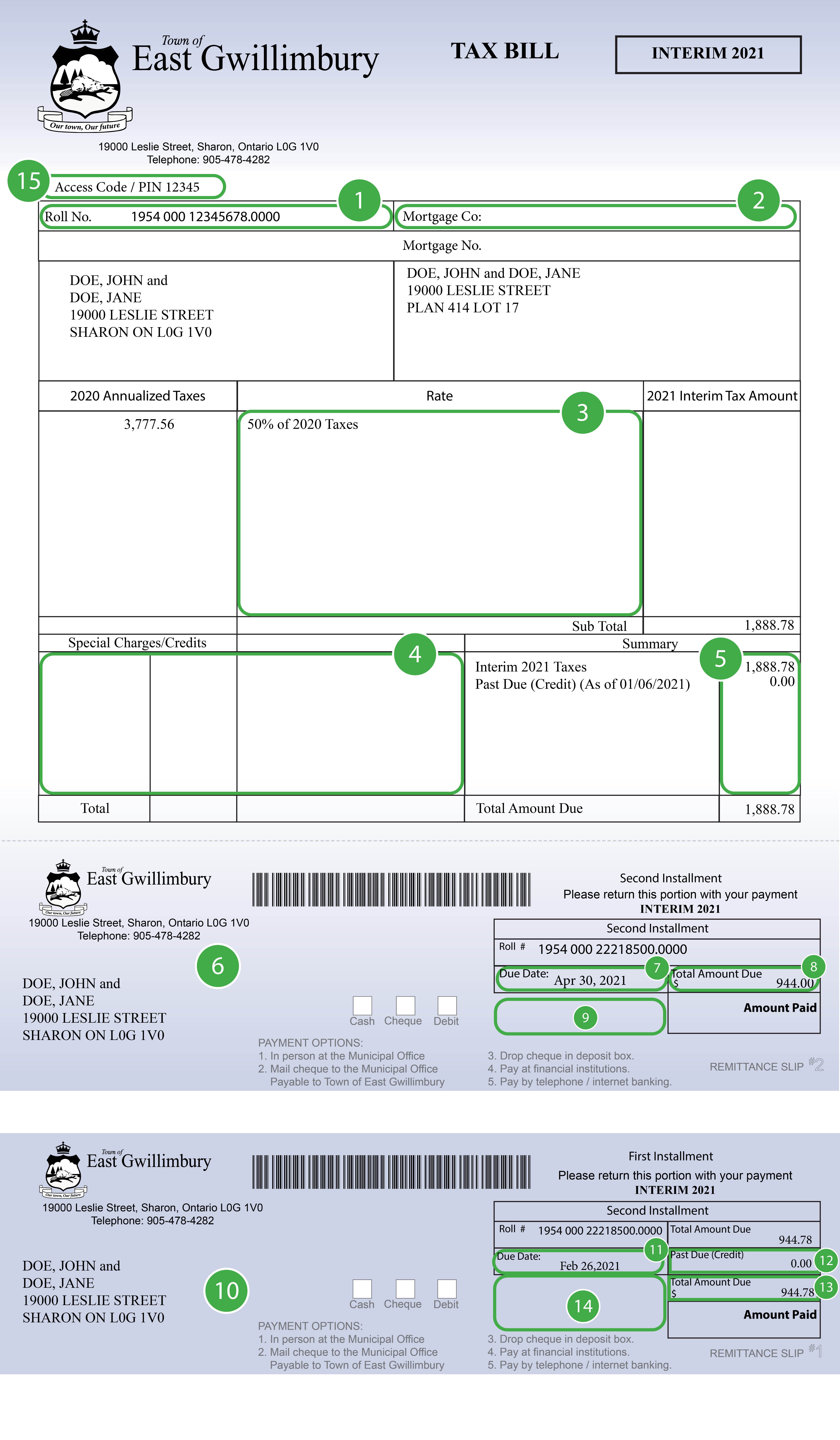 The sample interim tax bill corresponds with the numbers below to explain what each section is.
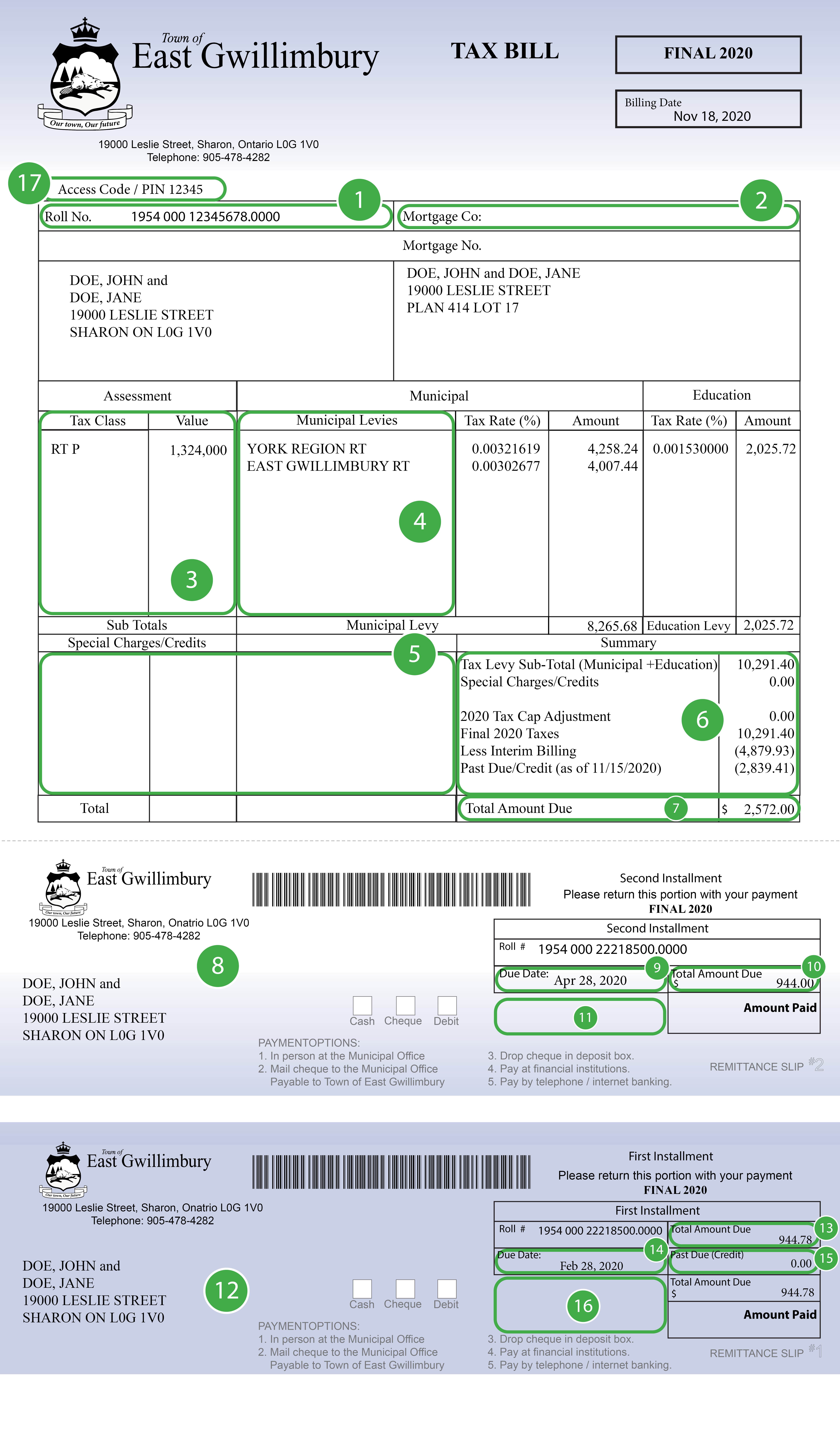 The sample final tax bill corresponds with the numbers below to explain what each section is.
Contact Us
Our Customer Service Team is here to help!


