Follow these steps:
1. Locate your water meter and lift the lid on top
2. Shine a bright light at the solar panel (near the top) to activate the display
3. Read the usage number. This number shows the total volume of water passed through the meter since installation. On a newer meter the decimal place is in between the 5th and 6th digit, and the reading is in cubic meters (m3)
4. Find the flow icon. Above the usage reading there is an arrow displayed if water is flowing. When the right-side arrow is visible there is water currently flowing in the home. If the arrow is flashing, water is running very slowly
5. Find the faucet icon. There is a space for a small faucet (“tap”) icon above the reading on the left-hand side
- Not Faucet Visible: No leak detected
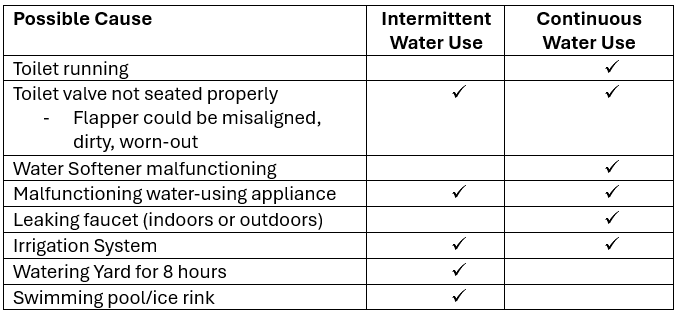
- Flashing Faucet: Intermittent water usage has been detected. This means water flowing over 50 of the 96 15-minute intervals over the past 24 hours
NOTE: a flashing icon may take up to 24 hours to clear after intermittent usage has stopped
- Solid faucet icon: Continuous water usage has been detected. This means water has continuously flowed through the meter for all 96 15-minute intervals over the past 24 hours
NOTE: If you make a repair, or turn off a water-using appliance, please do not use water and wait for at least 15 minutes. After 15 minutes, the indicator should change to flashing and disappear after 24 hours